- 시에르핀스키 2차원
시에르핀스키 삼각형
import matplotlib.pyplot as plt
import numpy as np

def sierpinski_triangle(order, vertices=None):
    if vertices is None:
        vertices = np.array([[0, 0], [1, 0], [0.5, np.sqrt(3)/2]])

    if order == 0:
        triangle = plt.Polygon(vertices, fill=True, edgecolor='black', facecolor='blue')
        plt.gca().add_patch(triangle)
    else:
        mid_points = np.array([
            (vertices[0] + vertices[1]) / 2,
            (vertices[1] + vertices[2]) / 2,
            (vertices[2] + vertices[0]) / 2
        ])

        sierpinski_triangle(order - 1, np.array([vertices[0], mid_points[0], mid_points[2]]))
        sierpinski_triangle(order - 1, np.array([mid_points[0], vertices[1], mid_points[1]]))
        sierpinski_triangle(order - 1, np.array([mid_points[2], mid_points[1], vertices[2]]))

# 재귀 횟수 조정
recursion_depth = 7

# 그래프 설정
fig, ax = plt.subplots(figsize=(10, 10))
ax.set_aspect('equal')
ax.axis('off')

# 시에르핀스키 삼각형 그리기
sierpinski_triangle(recursion_depth)
plt.tight_layout()
plt.show()
결과 예시

시에르핀스키 사각형
import matplotlib.pyplot as plt
import numpy as np

def sierpinski_carpet(x, y, size, depth, rectangles):
    if depth == 0:
        rectangles.append([x, y, size])
    else:
        new_size = size / 3

        positions = [
            (0, 0), (1, 0), (2, 0),
            (0, 1),         (2, 1),
            (0, 2), (1, 2), (2, 2)
        ]

        for dx, dy in positions:
            sierpinski_carpet(
                x + dx * new_size,
                y + dy * new_size,
                new_size,
                depth - 1,
                rectangles
            )

# 설정
recursion_depth = 4
color = 'cyan'
edge_color = 'black'

rectangles = []
sierpinski_carpet(0, 0, 1, recursion_depth, rectangles)

print(f"생성된 사각형 개수: {len(rectangles)}")

# 그리기
fig, ax = plt.subplots(figsize=(10, 10))

for x, y, size in rectangles:
    rect = plt.Rectangle((x, y), size, size,
                         facecolor=color,
                         edgecolor=edge_color,
                         linewidth=0.7)
    ax.add_patch(rect)

ax.set_xlim(0, 1)
ax.set_ylim(0, 1)
ax.set_aspect('equal')
ax.axis('off')
plt.tight_layout()
plt.show()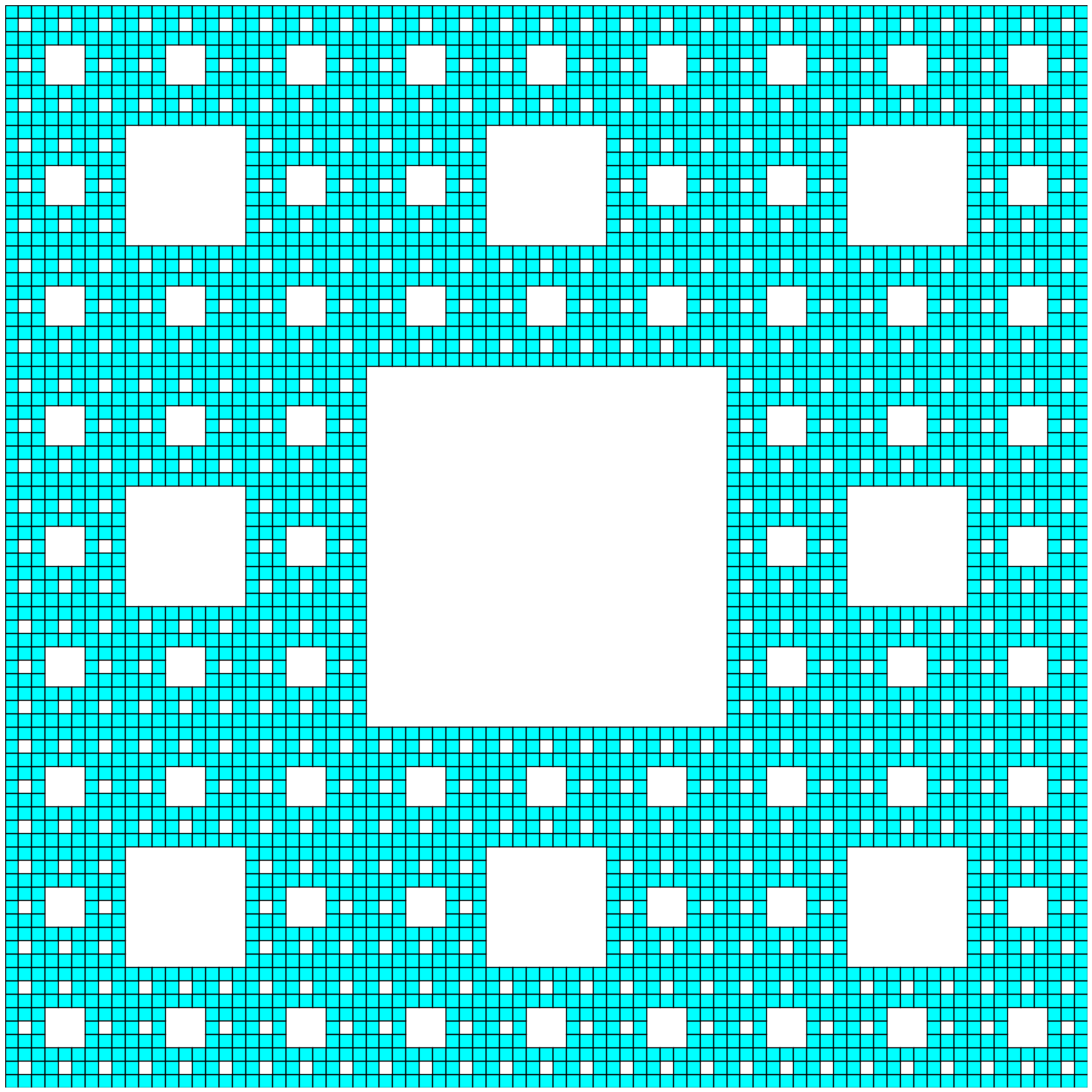
- 시에르핀스키 3차원
시에르핀스키 삼각형 3D
import matplotlib.pyplot as plt
from mpl_toolkits.mplot3d.art3d import Poly3DCollection
import numpy as np

def sierpinski_tetrahedron(vertices, depth, tetrahedra):
    if depth == 0:
        # 기본사면체 추가
        tetrahedra.append(vertices)
    else:
        # 모서리 중점 계산
        mid_points = np.array([
            (vertices[0] + vertices[1]) / 2,
            (vertices[0] + vertices[2]) / 2,
            (vertices[0] + vertices[3]) / 2,
            (vertices[1] + vertices[2]) / 2,
            (vertices[1] + vertices[3]) / 2,
            (vertices[2] + vertices[3]) / 2
        ])

        # 4개의 작은 사면체 재귀 호출
        sierpinski_tetrahedron(
            np.array([vertices[0], mid_points[0], mid_points[1], mid_points[2]]),
            depth - 1, tetrahedra
        )
        sierpinski_tetrahedron(
            np.array([mid_points[0], vertices[1], mid_points[3], mid_points[4]]),
            depth - 1, tetrahedra
        )
        sierpinski_tetrahedron(
            np.array([mid_points[1], mid_points[3], vertices[2], mid_points[5]]),
            depth - 1, tetrahedra
        )
        sierpinski_tetrahedron(
            np.array([mid_points[2], mid_points[4], mid_points[5], vertices[3]]),
            depth - 1, tetrahedra
        )

def draw_tetrahedron(ax, vertices, color='cyan', alpha=0.7): # 사면체 그리기

    # 사면체의 4개 면 정의
    faces = [
        [vertices[0], vertices[1], vertices[2]],
        [vertices[0], vertices[1], vertices[3]],
        [vertices[0], vertices[2], vertices[3]],
        [vertices[1], vertices[2], vertices[3]]
    ]

    # 면 그리기
    poly = Poly3DCollection(faces, alpha=alpha, facecolor=color, edgecolor='black', linewidth=0.5)
    ax.add_collection3d(poly)

# 설정
recursion_depth = 5  # 재귀 횟수
color = 'cyan'
alpha = 0.7          # 투명도 관련

# 초기 정사면체 꼭짓점 설정
initial_vertices = np.array([
    [0, 0, 0],
    [1, 0, 0],
    [0.5, np.sqrt(3)/2, 0],
    [0.5, np.sqrt(3)/6, np.sqrt(2/3)]
])

# 사면체 리스트 생성
tetrahedra = []
sierpinski_tetrahedron(initial_vertices, recursion_depth, tetrahedra)

# 3D 플롯 생성
fig = plt.figure(figsize=(12, 10))
ax = fig.add_subplot(111, projection='3d')


# 모든 사면체 그리기
for tetra in tetrahedra:
    draw_tetrahedron(ax, tetra, color=color, alpha=alpha)

# 축 그리드 제거
ax.set_axis_off()

plt.tight_layout()
plt.show()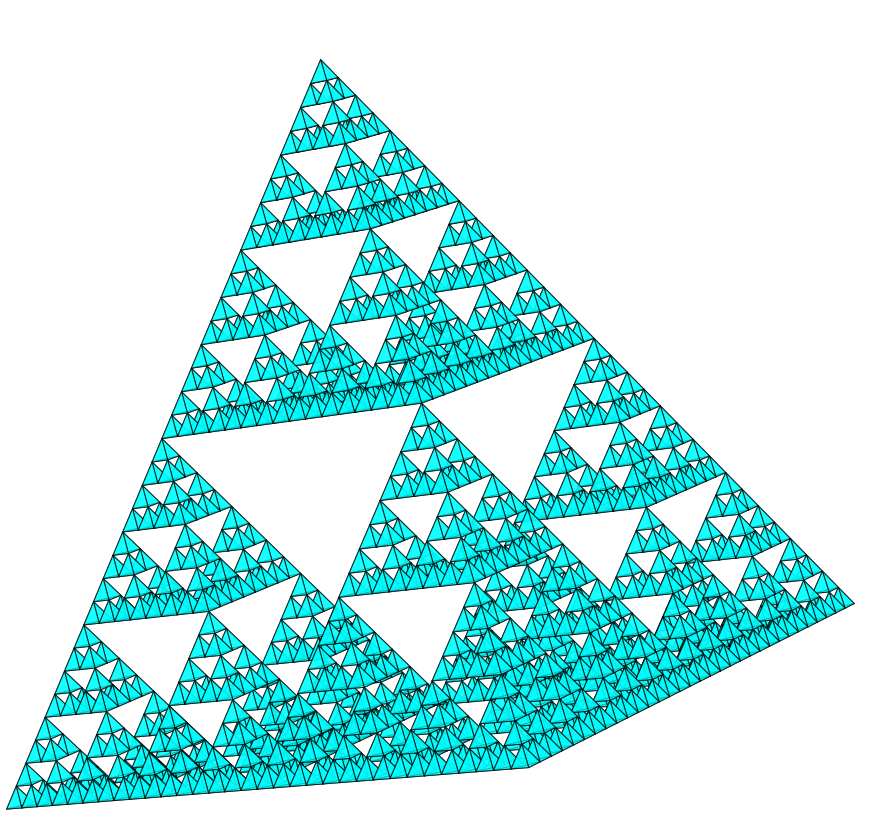


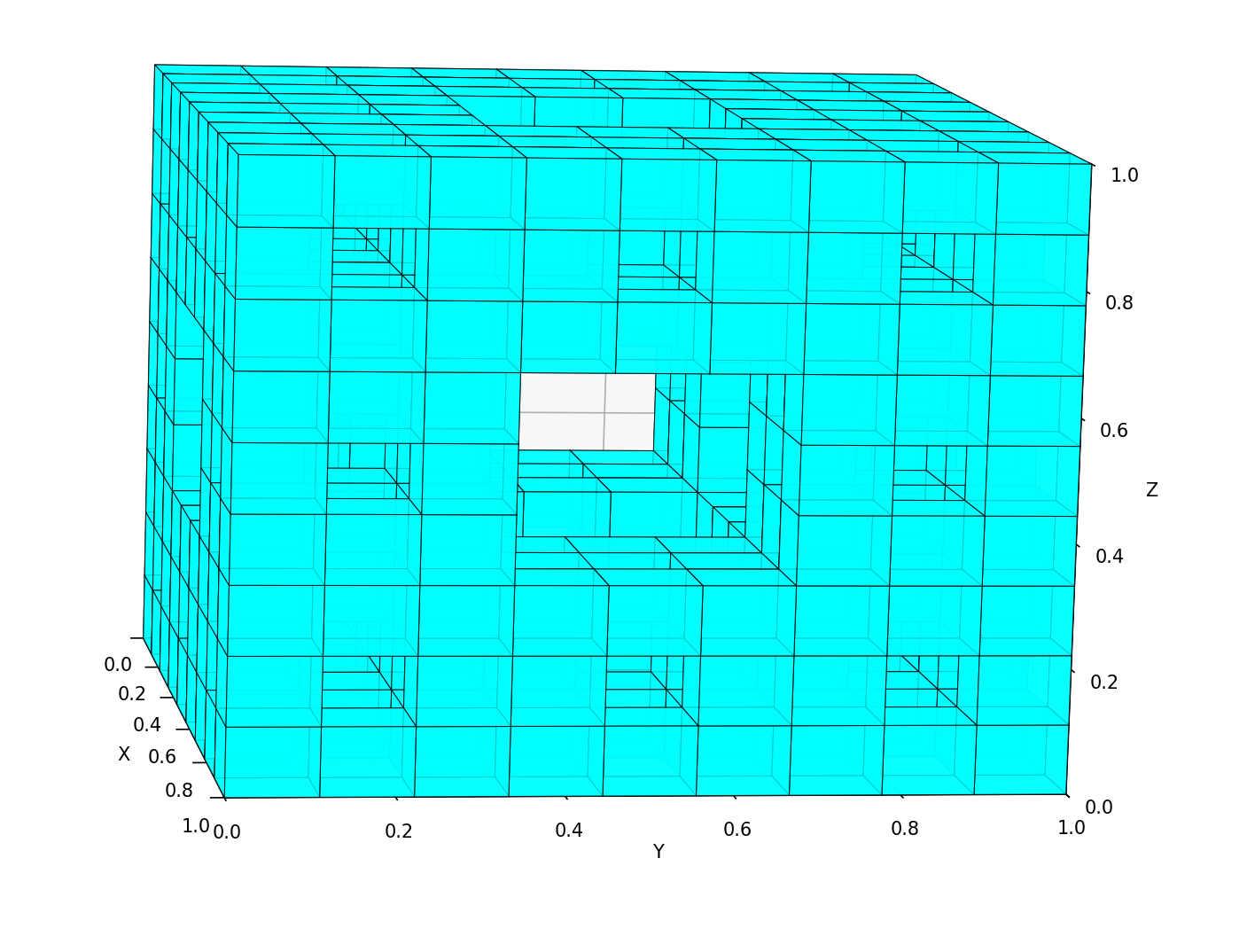
시에르핀스키 사각형 3D
import matplotlib.pyplot as plt
from mpl_toolkits.mplot3d.art3d import Poly3DCollection
import numpy as np

def menger_sponge(x, y, z, size, depth, cubes):
    if depth == 0:
        cubes.append((x, y, z, size))
    else:
        new_size = size / 3

        for i in range(3):
            for j in range(3):
                for k in range(3):
                    center_count = (1 if i == 1 else 0) + (1 if j == 1 else 0) + (1 if k == 1 else 0)
                    if center_count >= 2:
                        continue

                    menger_sponge(
                        x + i * new_size,
                        y + j * new_size,
                        z + k * new_size,
                        new_size,
                        depth - 1,
                        cubes
                    )

def get_cube_faces(x, y, z, size):
    vertices = np.array([
        [x, y, z],
        [x + size, y, z],
        [x + size, y + size, z],
        [x, y + size, z],
        [x, y, z + size],
        [x + size, y, z + size],
        [x + size, y + size, z + size],
        [x, y + size, z + size]
    ])

    faces = [
        [vertices[0], vertices[1], vertices[2], vertices[3]],
        [vertices[4], vertices[5], vertices[6], vertices[7]],
        [vertices[0], vertices[1], vertices[5], vertices[4]],
        [vertices[2], vertices[3], vertices[7], vertices[6]],
        [vertices[0], vertices[3], vertices[7], vertices[4]],
        [vertices[1], vertices[2], vertices[6], vertices[5]]
    ]

    return faces

# 설정
recursion_depth = 2
color = 'cyan'
alpha = 0.8
figure_size = (12, 10)

# Collect cubes
cubes = []
menger_sponge(0, 0, 0, 1, recursion_depth, cubes)
print(f"Generated cubes: {len(cubes)}")

# Collect all faces
all_faces = []
for x, y, z, size in cubes:
    all_faces.extend(get_cube_faces(x, y, z, size))
print(f"Total faces: {len(all_faces)}")

# Create 3D plot
fig = plt.figure(figsize=figure_size)
ax = fig.add_subplot(111, projection='3d')


poly = Poly3DCollection(all_faces, alpha=alpha, facecolor=color,
                       edgecolor='black', linewidth=0.5)
ax.add_collection3d(poly)

# Axis settings
ax.set_xlabel('X')
ax.set_ylabel('Y')
ax.set_zlabel('Z')
ax.set_title(f'Menger Sponge (Recursion Depth: {recursion_depth})', fontsize=14)

ax.set_xlim([0, 1])
ax.set_ylim([0, 1])
ax.set_zlim([0, 1])

plt.tight_layout()
plt.show()
'수학 학문 > 기하학' 카테고리의 다른 글
| 삼각함수, 역삼각함수, 삼각함수의 역수 (0) | 2025.10.29 |
|---|---|
| 아르키메데스의 원주율 계산 (1) | 2025.10.22 |
| 중점연결정리증명 (0) | 2025.08.09 |
| Moley의 정리 증명 (0) | 2025.07.30 |
| 톨레미 정리 증명법 다섯가지 (4) | 2025.07.30 |